Tarspay_en_INR
    • Access Guide
    • Core business process description
    • Attachment code table
    • deposit
      • Create a collection order
        POST
      • Get collection order results
        POST
      • utr query
        POST
      • utr supplement
        POST
    • withdraw
      • Create payment order
        POST
      • Get payment order results
        POST
    • Account Balance
      • Get balance information
        POST
    • callback
      • Callback notification interface (customized by merchant)
        POST

    Access Guide

    Access Guide#

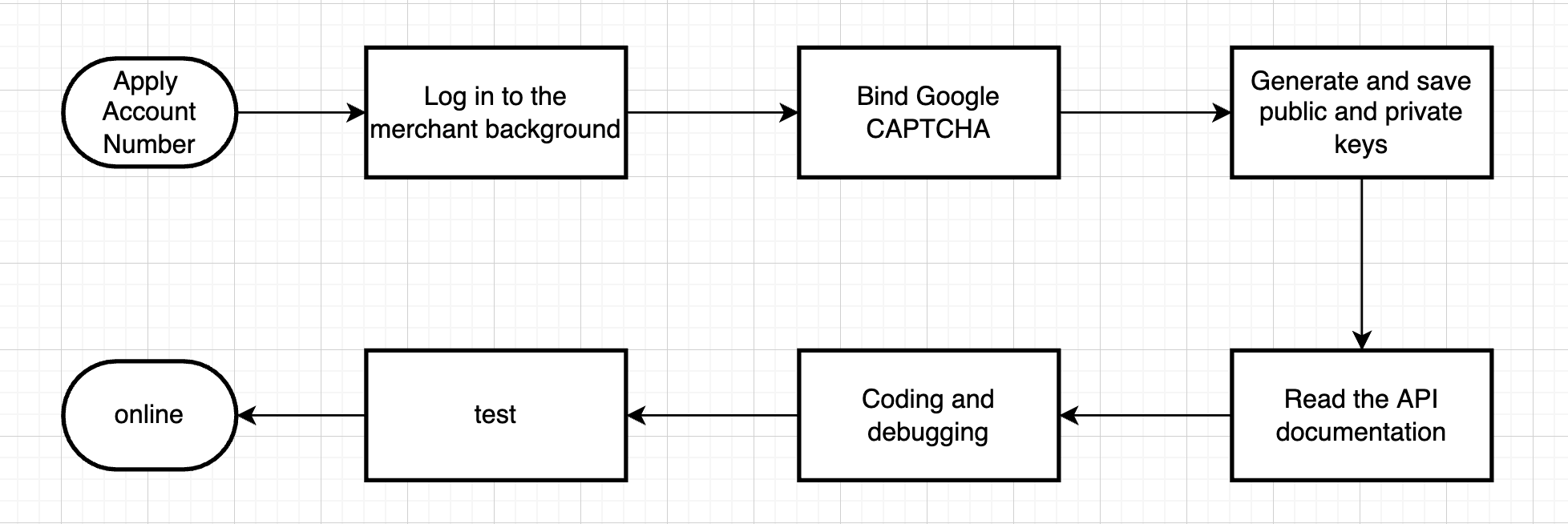
    Preparatory work instructions before docking#

    Public and private key application path#

    Account Management->APIKey Management->New
    During the official launch stage, we strongly recommend that you bind the server IP address. The APIKey that is not bound to the IP address can only be used for 15 days. It will take effect again after modifying the APIKey to bind the server IP.

    System PublicKey#

    03029c655932f22aee81034d109795fbd7e23ca173ca27e195091d434e593a2e0f

    Instructions for using public and private keys & system public keys#

    Request domain name#

    https://payment.tarspay.com

    Request structure#

    This is accomplished by sending an HTTP POST request to the server address of the Tarspay API, and adding the corresponding request parameters to the HTTP body and HTTP header according to the request structure. The Tarspay system responds to the return parameters based on the request parameters.

    letter of agreement#

    For higher security, the Tarspay API interface only supports request communication through the HTTPS channel. When calling the Tarspay system API, the following security requirements need to be followed:
    All requests must use SSL, otherwise the request will be rejected. Only TLS 1.2 or TLS 1.1 is supported. SSLv3 and TLS 1.0 are not supported. The merchant system communicates with the Tarspay system and uses signature verification to ensure the integrity of communication information and communication security. See (signature mechanism ).

    Character Encoding#

    Both requests and returned results are encoded using the UTF-8 character set.

    Parameter format#

    Both request parameters and return parameters use JSON format.
    Content-Type: application/json;charset=utf-8

    Return parameters#

    {
       "code":0,
       "msg":"SUCCESS",
       "data":{
           ...
       }
    } 
    FieldTypeDescription
    codeinteger0 means the request is successful, non-0 means failure
    dataobjectThe return value that describes the business call situation. For details, please refer to the data value of each interface in the business interface
    msgstringResponse message

    Notification mechanism#

    Tarspay will send the message of the consumer's payment result to the notifyUrl provided by the merchant through the server, and carry relevant parameters and submit it in the form of POST. Merchants need to perform signature verification on the result information to prevent forged notification information; and must judge the order status in the returned results to determine the order status.
    After receiving the request, the merchant server must respond with HTTP 200 and print out the OK string. If the characters fed back to Tarspay by the merchant are not OK characters, the Tarspay server will continuously resend the notification.
    In some cases, a merchant may receive multiple notifications from Tarspay for an order. The merchant needs to check its own logic and conduct unique business processing for order notifications that may receive repeated success or failure status.

    Signature mechanism#

    When a merchant calls the Tarspay API interface, the request method, request path, request timestamp and business parameters must be obtained in the form agreed by Tarspay to obtain the corresponding signature string and used as the request header parameter ````X-API- SIGNATUREis passed to Tarspay. The data prepared before signing is as follows:HTTP_METHOD+ "|" +HTTP_REQUEST_PATH+ "|" +TIMESTAMP+ "|" +PARAMS``` After the connection is completed, perform the data ECDSA signature, the signed bytes are Hex encoded.

    HTTP_METHOD:#

    POST

    HTTP_REQUEST_PATH:#

    For example, create an order collection interface:
    The request path of https://payment.tarspay.com/api/pay/unifiedOrder is /api/pay/unifiedOrder

    TIMESTAMP:#

    UNIX EPOCH timestamp (accurate to milliseconds) when the API was accessed

    PARAMS:#

    First sort the keys alphabetically, and then parameterize the url, that is, password=password username=username. Because p is sorted before u in the alphabet, password must be placed before username, and then use & to connect, that is: password= password&username=username request parameters are the same for POST and GET. All parameters need to be taken out. The signature rules are as follows: All requested keys are sorted in alphabetical order, and then spliced ​​in the form of key=value (the value does not require urlencode), and use & connect.
    Note: The business fields are not fixed. All business fields participate in the signature. It is recommended to process it dynamically to cope with possible additions and subtractions of fields.

    Complete example#

    For the following requests:
    HTTP_METHODHTTP_REQUEST_PATHTIMESTAMP
    POST/api/v1/test1537498830736
    PARAMS
    Parametervalue
    amount100
    price100
    The preparation data before signing is as follows:
    1.
    Assume that all data sent or received is a set M, and the parameters with non-empty parameter values ​​in the set M are sorted from small to large according to the ASCII code of the parameter name (lexicographic order), using the format of URL key-value pairs (i.e. key1=value1&key2 =value2...) concatenated into a string:
    Tip: content does not require URLEncode
    2、Concatenate the concatenated string content and method request information MERTHOD, URL and NONCE into a new string separated by "|":
    3、Use the private key you generated (PrivateKey) to perform ECDSA signature on the spliced ​​data, and Hex encode the binary result to generate the final signature for verification to the API server.
    Put the Api key, nonce and signature generated on the right into the Header according to the above name, and you can pass the signature verification
    The Tarspay signature verification public key can be obtained on the "Web Management Interface - Account Management - apikey" page

    Signature tool reference#

    java#
    Maven dependency#
    <dependency>
      <groupId>org.bouncycastle</groupId>
      <artifactId>bcprov-jdk15on</artifactId>
      <version>1.64</version>
      <scope>compile</scope>
    </dependency>
    Signature tool class#

    Utils#

    php demo#
    Download link
    Modified at 2024-01-12 08:21:12
    Next
    Core business process description
    Built with